Line modes
The chart plots one of two families of lines. The console, the ladder and every alert follow the line the chart is set to: the core line in Flow mode, the Buy and Sell lines in Buy / Sell mode.
| Mode | Lines drawn | Band |
|---|---|---|
| Flow (default) | Total Flow, Passive Flow, Aggressive Flow, Placement Flow (hidden by default) | Flow Resistance / Flow Support, sized from the core line |
| Buy / Sell | Buy Line and Sell Line (the two passive sides, or the two placement sides), and the Delta Line (Buy minus Sell) | Buy/Sell Resistance / Buy/Sell Support, one shared band |
Resistance and Support lines are always drawn.
Why modes rather than toggles: the two families live on very different scales. The buy and sell lines are running totals of one side of the book, which on a busy instrument can reach tens of thousands of contracts, while Total Flow is their difference, often a few thousand. Plotting them together squashed the flow lines flat. One family per panel keeps every line readable.
The Delta line
Earlier versions had a separate Delta line: buy-side flow minus sell-side flow. In Flow mode it is the Passive Flow line. The Buy / Sell mode has it too, as the Delta Line, so a 2.x layout with Buy, Sell and Delta can be set up again. See buy & sell lines.
Switching modes
- Bookmap: Settings → Configure add-ons → Pulling & Stacking Indicator → Parameters → Line Mode*, then Apply core settings changes and restart indicators. The Line Colors section lists only the lines of the saved mode.
Switching modes does not restart the warm-up of the flow lines: the flow engine keeps its history, only the lines are re-registered. The Buy / Sell band is kept only while a chart is in Buy / Sell mode, so it warms up over one primary window (five minutes by default) when you switch to that mode.
Hiding an individual line
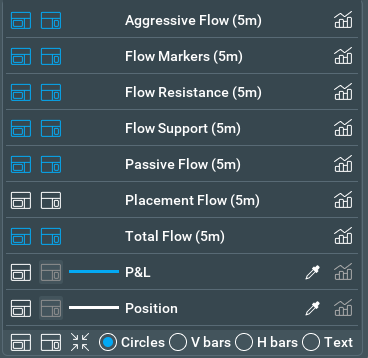
- Bookmap: the gear at the top of the widget pane lists the lines of the current mode; each has one button for the line and one for its widget.
Next: buy & sell lines
Chart images. The chart images on this site show the indicator's display on market data, to explain what it draws. They are not trading results or trade recommendations, and the risk and hypothetical performance disclosures above apply to them. We publish no trading performance. The full text is on the disclosures page.