Notifications
There are two kinds of alert. Both appear in the console, and neither fires while a window is warming up or the feed is stale, or while the order book data has stopped.
Both read the line the console tile reads. That is the line the chart is set to, unless Console Mode makes the console read the other family: then the alerts follow the console. The price-chart arrows are not alerts; they always follow the chart. The minimum alert interval and the sound apply to both kinds whichever line they read, and every alert names its line, so the log always says which reading crossed.
Per-instrument alerts
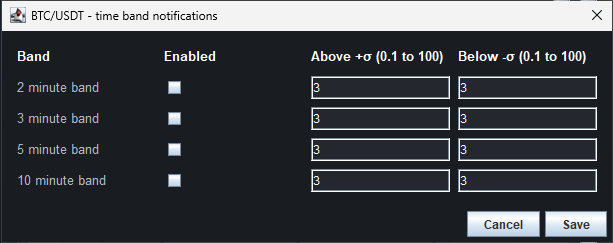
Set from the bell on an instrument's tile in the console.
- Choose any of the 2, 3, 5, and 10 minute windows.
- Each window has its own Above +σ and Below −σ threshold (default 3).
- An alert fires when the tile's line on that window crosses the threshold (when the tile reads Buy / Sell, the Buy Line or the Sell Line), then re-arms when the reading comes back inside it.
- The alert is written to that instrument's log:
ALERT 5m Total Flow crossed +3.0σ (+3.4σ).
Global notifications
One shared threshold for every instrument, set from Global notification settings in the console. Global alerts watch the line each tile reads on the primary window, and appear in the Global notifications log at the bottom of the console:
15:53:34 BTC-USDT Total Flow crossed +3.0σ (+4.3σ) (5m)
15:54:02 ETH-USDT Placement Flow crossed -3.0σ (-3.4σ) (5m)
15:54:40 SOL-USDT Buy Line crossed +3.0σ (+3.5σ) (5m)

| Setting | Meaning |
|---|---|
| Global alerts for each tile's line | Turns global alerts on or off. Off by default. |
| Global threshold (standard deviations) | The σ level that triggers a global alert. |
| Minimum alert interval per band (seconds) | Quiet period before the same band can alert again. Saving new thresholds re-arms the bands, so a band can alert at once on its new threshold. Default 60. |
| Notification sound (global and ticker alerts) | Sound for both kinds of alert. Works while the console is hidden. |
On MotiveWave
- The default global threshold is 3σ.
- Each alert also raises the indicator's MotiveWave signal Pulling & Stacking alert, so you can add MotiveWave's own alert options (sound, popup, email); see MotiveWave signals. MotiveWave starts with the signals off, so for alerts to reach MotiveWave's Alerts panel you must enable them: on the study's Signals tab leave All ticked (it is ticked already; clicking it unticks it), tick Enabled, choose the popup, sound or email, and click Update. The console's own alerts (the bell and Global notifications) work without this step.
- There are no alerts over bars from before the study started: the indicator draws nothing there.
- After a pause (the licence released or not reachable) or a stale period, each band is armed again. A reading that is still beyond its threshold then alerts once more, although it never came back inside it.
Next: MotiveWave settings
Chart images. The chart images on this site show the indicator's display on market data, to explain what it draws. They are not trading results or trade recommendations, and the risk and hypothetical performance disclosures above apply to them. We publish no trading performance. The full text is on the disclosures page.